7 Prompts Freelance Writers Can Reuse for Client Briefs
Seven copy-and-paste prompts that cover a freelance writing job from messy client message to final revisions, with one run shown for real.
7 Prompts Freelance Writers Can Reuse for Client Briefs
Most client briefs are a few lines in a chat window. “Make it fun but not cringe. Launching soon.” The writer’s job is to turn that into something specific enough to write well. These seven prompts are how I’d use AI for that. Each one has a single job, and each one tells the AI to stick to what you actually know.
A note on honesty: I ran prompt 1 live and show the result below. The other six are templates built on the same pattern. I have not run all seven on a paid client job, so adjust them to your own work and keep the ones that help.
The rule behind all seven
Every prompt includes some version of “only use what I give you; put anything else under Unknowns”. Without it, AI fills gaps with confident guesses, and a guess about a client’s audience or deadline is how projects go wrong.
1. Turn a messy message into a brief
Turn this messy client message into a one-page brief I can confirm with them. Use these headings: Goal, Audience, Deliverables, Tone, Length, Deadline, Unknowns. Only use what the message says. Anything not stated goes under Unknowns as a question, never as a guess.

CLIENT MESSAGE: [paste]
I tried it on an invented message from a water-bottle brand:
hey so we sell reusable water bottles, mostly to students. need a few product descriptions for the website, make them fun but not cringe. we’re launching in a few weeks. there are 4 bottles. oh and we dont want to sound like every other bottle brand
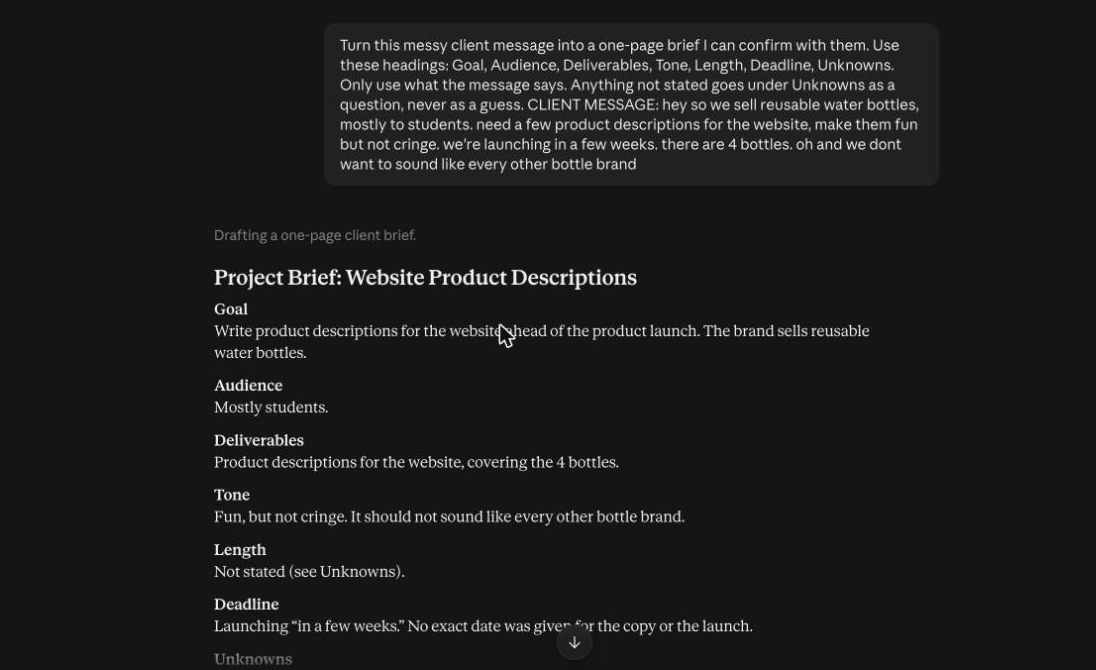
It filled in only what the message said: audience is students, four bottles, tone is “fun but not cringe”, deadline is “a few weeks”. Length it marked “not stated”. Then it listed nine questions under Unknowns, including how long each description should be, what the four bottles are, what “every other bottle brand” sounds like to them, and who approves the final copy. It did not invent a word count or a deadline. That is the behaviour you want.
Send the Unknowns list to the client as your first reply. It shows you read the message properly, and the answers decide your price.
2. Questions to ask before you quote
I'm a freelance writer about to quote on this job. Based on the brief below, list the questions whose answers would change my price or timeline, most important first. Skip anything I can find out myself. Maximum 8 questions.

[paste brief]
The “most important first” and “maximum 8” limits stop the AI producing a 20-question interrogation that no client will answer.
3. Outline before you draft
Using only this brief, propose an outline for each deliverable: a working title, 3-5 section headings, and one sentence on what each section must do for the reader. Do not write the copy yet.

[paste brief]
Agreeing an outline with the client takes two minutes and prevents rewriting a whole piece.
4. Draft in the client’s voice
Here are two samples of the client's existing writing. Describe their voice in five bullet points (sentence length, formality, humour, words they favour or avoid). Then write the section below in that voice. Do not copy phrases from the samples.

SAMPLES: [paste]
SECTION BRIEF: [paste]
Asking for the voice description first lets you correct it before the AI writes anything. If the description is wrong, the draft will be wrong.
5. Check the draft against the brief
Here is the brief and here is my draft. Go through the brief line by line. For each requirement, say whether the draft meets it and quote the part of the draft that shows it. List anything the brief asks for that the draft misses.

BRIEF: [paste]
DRAFT: [paste]
Asking for a quote stops the AI saying “yes, it meets that” without evidence. This is the fastest way I know to catch the thing you forgot.
6. List every claim that needs checking
List every factual claim in this draft (numbers, dates, names, comparisons, "best" or "first" claims). For each, say whether I supplied it or whether it came from you, and mark anything I would need a source for.

[paste draft]
This does not make the draft correct. It makes the claims visible, so you can check them before the client does.
7. Turn vague feedback into a change list
The client sent this feedback on my draft. Turn it into a numbered list of specific changes. Where the feedback is vague, don't guess: write a question I should ask to clarify it.

FEEDBACK: [paste]
“Make it pop” is not a change. This prompt turns it into a question you can ask, and that saves a revision round.
How I’d use them in order
- Prompts 1 and 2 before you quote.
- Prompt 3 before you draft.
- Prompt 4 to draft, then edit it by hand until it sounds like a person wrote it.
- Prompts 5 and 6 before you send.
- Prompt 7 when feedback comes back.
None of these replaces your judgement about what the client really needs. They are there so you spend your time on that judgement and less on admin.